
Every transaction, every balance, every page.
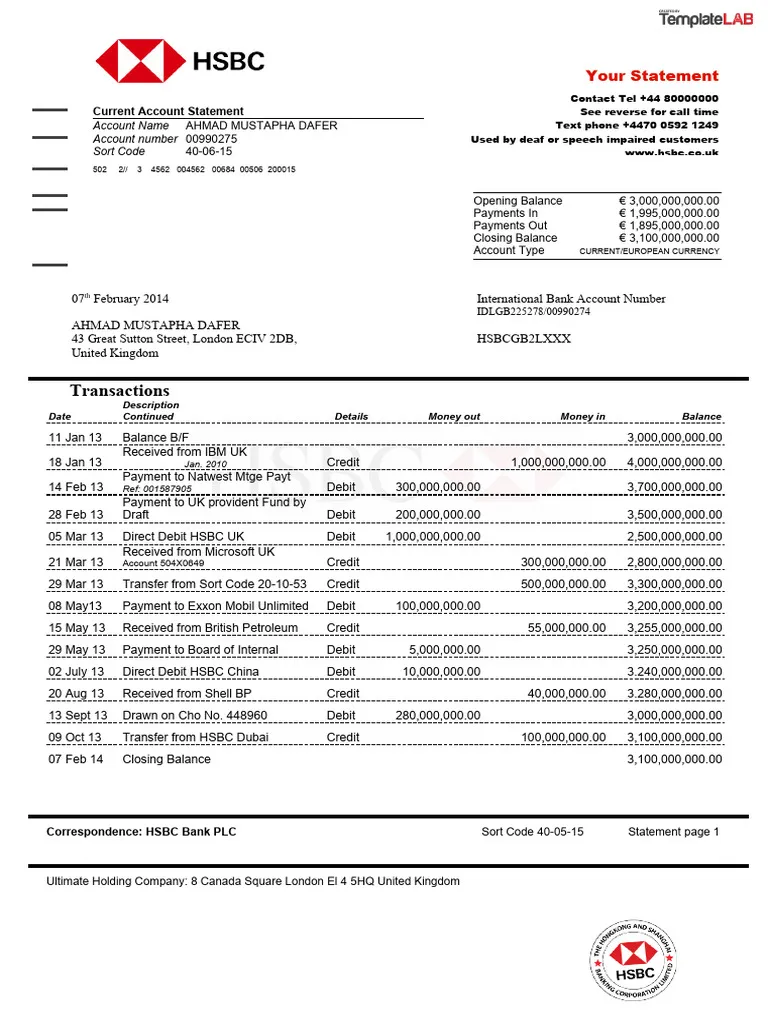
Bank name, account holder, IBAN, currency, opening and closing balances, plus every dated transaction with debit, credit, and running balance — reconciled across multi-page statements.
Live demo
See it on a real document.
Click a field on the right and we'll highlight where it came from on the left.
Extracted fields
Transactions
| Date | Debit | Credit | Balance | Description |
|---|---|---|---|---|
Sample data. Real engine output.
Overview
What is bank statement data extraction?
Bank statement data extraction turns multi-page PDFs of transaction history into clean, reconcilable structured data. The use case sits at the heart of loan underwriting, cash-flow forecasting, forensic accounting, and any consumer app that aggregates accounts across institutions that don't expose an Open Banking API. Done by hand it's an hour of typing per statement; done with regex it breaks the moment a bank tweaks its layout.
On a typical statement, Ztract extracts the bank name, account holder, account number, and IBAN; the currency and statement period; the opening and closing balance; the summary total debits and total credits; and the full transactions table with date, description, debit, credit, and running balance for every line. The sample above is a 15-transaction HSBC euro account — balances reconcile to the closing total exactly because nothing was dropped or misaligned across the page break.
Statements that run 20+ pages are the norm. Column headers repeat at the top of each page, summary blocks shift between formats, and pending vs cleared transactions live in different sections. Ztract keeps the transaction order intact, deduplicates the repeated headers, and tags pending lines so downstream reconciliation doesn't double-count. Multi-line transaction descriptions — common on wire transfers and SEPA credits — stay attached to the right row.
Hard parts
Where this gets tricky.
The reasons this doc type is harder than it looks — and how we handle them.
-
Tables that span 20+ pages
Statements run long. Column headers repeat on every page; we keep columns aligned and transactions in chronological order across the entire document.
-
Multi-line transaction descriptions
Wire transfers and SEPA credits carry two or three lines of memo. We keep the lines together as one transaction rather than splitting them into orphan rows.
-
Foreign-currency transactions
A USD account with EUR purchases: both the booked-currency and the local-currency amount come back distinctly, with the exchange rate when the statement prints it.
-
Pending vs cleared
Pending transactions live in their own section with their own format. We tag them so downstream reconciliation doesn't double-count a transaction that hasn't settled yet.
Who uses it
Workflows this lands in.
-
Loan underwriting
Pull 12 months of statements into a reconciled cash-flow view without ops staff retyping every line.
-
Budgeting apps
Categorize transactions across institutions that don't expose an Open Banking API — no PDF-uploaded-then-typed step.
-
Forensic accounting
Trace funds across statements and parties with every value anchored to its source page for audit defensibility.
FAQ
Common questions.
Does Ztract handle multi-page bank statements?
What about foreign-currency transactions?
Can the extracted balances be reconciled?
Does bank statement parsing work for non-English banks?
What output formats are available?
Related
Also useful for these documents.
-
Invoices & purchase orders
Line items, totals, tax IDs, currencies — across thousands of vendor layouts.
-
Receipts & expense reports
Merchant, items, tax, tip, payment method — even when the paper is wrinkled or faded.
-
Contracts & NDAs
Parties, effective dates, renewal terms, governing law, signatures — out of dense legalese.
Try it on your own document.
Start free with 30 pages. No credit card, no subscription, no setup.