
Pull every line item out of every invoice.
Invoice number, dates, vendor info, every line-item row with quantity and unit price, plus per-line VAT and reconciled totals — extracted from any invoice layout, in any currency or language.
Live demo
See it on a real document.
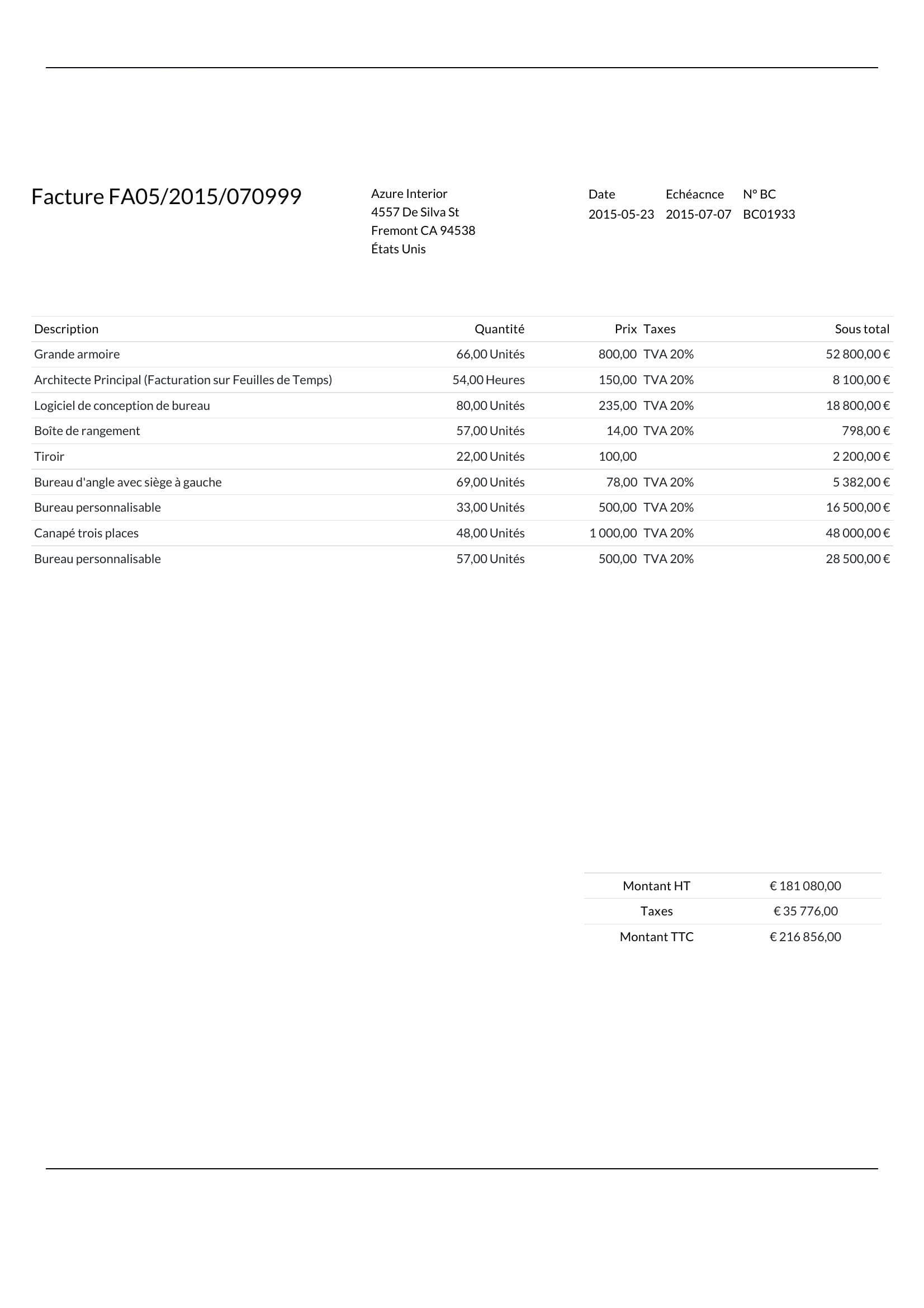
Click a field on the right and we'll highlight where it came from on the left.
Extracted fields
Line items
| Quantity | Subtotal | Tax rate | Unit price | Description |
|---|---|---|---|---|
Sample data. Real engine output.
Overview
What is invoice data extraction?
Invoice data extraction is the process of turning unstructured invoice PDFs and scans into structured data that finance tools can read — invoice number, issue date, vendor details, every line item, and the totals at the bottom. The work that used to take an accounts-payable clerk five minutes a document now takes the engine a few seconds, and the values come back JSON-clean rather than copy-pasted into a spreadsheet.
On a typical invoice, Ztract returns the invoice number, issue date, due date, and purchase order number; the vendor's company name and billing address; the full line-item table with descriptions, quantities, unit prices, and per-line tax rates; and three reconcilable totals — subtotal, total tax, and total including tax. The sample above is a 9-line French invoice with VAT at 20% — every value is anchored to its position on the page so a reviewer can verify in one click.
The engine doesn't depend on a template. A new vendor layout works on the first invoice — no rules, no per-supplier setup. Invoices in French, Spanish, Japanese, or Arabic are read in the script as printed; currencies stay distinct in the output instead of being silently coerced; per-line VAT remains attached to the row it belongs to. When the engine cannot return a clean value, the failed page is refunded to your pack.
Hard parts
Where this gets tricky.
The reasons this doc type is harder than it looks — and how we handle them.
-
Line items that span pages
Tables don't end where the page ends. Headers repeat, totals show only on the last page — we stitch the list back into one clean array.
-
Per-line tax variation
Goods at 0%, services at 20%, shipping at 10% — on the same invoice. Tax rate stays with the row it belongs to, not aggregated away into the footer.
-
Multi-currency, multi-language
Invoice in USD, payment instructions in EUR; descriptions in French, totals in numerals — both currency and script are preserved instead of normalized.
-
Subtotal vs total disambiguation
Different vendors print 'TOTAL' boxes in different places with different meanings. We use document context, not position, to pick the right one.
Who uses it
Workflows this lands in.
-
Accounts Payable
Auto-feed approved invoices into NetSuite, QuickBooks, or any ERP — without anyone typing the line items.
-
Finance
Roll up vendor spend by tax ID, category, and currency from PDFs accountants used to code by hand.
-
Compliance
Keep every value linked to its bbox on the source so an auditor can verify any number with a single click.
FAQ
Common questions.
How is Ztract different from traditional invoice OCR?
Can Ztract extract line items from multi-page invoices?
What languages and currencies does invoice extraction support?
What output formats are available for extracted invoice data?
What happens when a field can't be read?
Related
Also useful for these documents.
-
Receipts & expense reports
Merchant, items, tax, tip, payment method — even when the paper is wrinkled or faded.
-
Bank & credit card statements
Opening and closing balances, every transaction, with running totals that reconcile.
-
Shipping & customs docs
HS codes, weights, ports, parties — for trade compliance teams running thousands a day.
Try it on your own document.
Start free with 30 pages. No credit card, no subscription, no setup.