
Faded thermal receipts, parsed line by line.
Items with SKU codes, quantities, unit prices, line totals, rounding, cash given, and change — extracted from scans and phone photos, in any language and currency.
Live demo
See it on a real document.
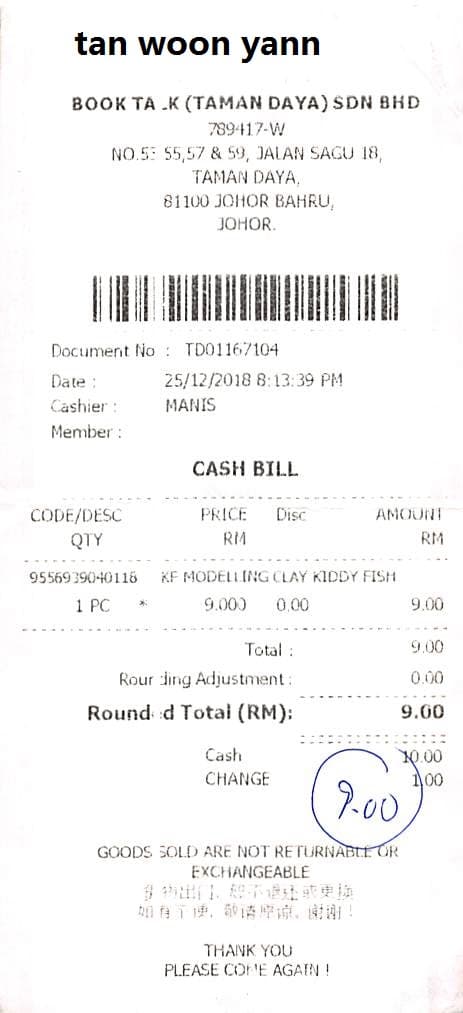
Click a field on the right and we'll highlight where it came from on the left.
Extracted fields
Items
| Code | Price | Amount | Discount | Quantity | Description |
|---|---|---|---|---|---|
Sample data. Real engine output.
Overview
What is receipt data extraction?
Receipt data extraction is the process of turning physical or digital sales receipts — thermal paper, phone photos, scanned PDFs — into structured records with each value tied back to its position on the receipt. Expense reporting, audit trails, duplicate detection, and personal-finance apps all sit on this base layer, and historically all of it required either manual data entry or hand-tuned regex per merchant.
For the sample receipt above, Ztract returns the document number, transaction date and time, and cashier name; an items table with SKU code, description, quantity, unit price, discount, and line amount; the total amount, rounded total, and rounding adjustment; plus the cash given and change given. SKU codes are preserved exactly as printed — barcode-readable strings, which matters when you're feeding the data into inventory or duplicate-check pipelines.
Receipts are some of the worst inputs an extraction engine sees: thermal paper fades unevenly, the paper folds at exactly the wrong line, item descriptions appear in the local script with prices in local currency, and merchants in different regions print rounding adjustments in different places. Ztract handles all of this without per-merchant templates — drop a phone photo of a stapled stack of three receipts and each one comes back as its own structured record.
Hard parts
Where this gets tricky.
The reasons this doc type is harder than it looks — and how we handle them.
-
Thermal paper fading and folds
Heat-printed receipts fade unevenly and the paper folds at exactly the wrong line. We read what's there even when the contrast is gone, with per-field confidence flagging the borderline values.
-
Items and prices in mixed scripts
A Japanese izakaya in São Paulo, a Korean BBQ in Berlin — item descriptions stay in the local script, prices stay in the printed currency. Both come back cleanly without normalization.
-
Rounding, tip, and cash variations
Cash receipts round to the nearest 5 or 10 cents; restaurant tips appear as a fixed amount, a percentage, or split across cards. Each variation lands in its own field so finance reports stay reconcilable.
-
Multiple receipts per scan
Phone photos with three receipts in one shot, scans of a stapled stack — each receipt is detected separately and parsed as its own structured record.
Who uses it
Workflows this lands in.
-
Expense reporting
Feed parsed receipts into Concur, Expensify, or Ramp without anyone retyping the merchant, items, or amount.
-
Audit & accounting
Flag duplicate receipts via SKU code, surface merchant outliers, and reconcile cash-and-change as the documents arrive.
-
Personal finance
Power consumer apps that snap-and-track every purchase — across receipts in any language or local currency.
FAQ
Common questions.
Can Ztract read faded or crumpled receipts?
Does receipt extraction handle multi-currency or non-English merchants?
How does Ztract handle SKU codes and item descriptions?
Can I batch multiple receipts in one upload?
How is receipt extraction different from a generic OCR service?
Related
Also useful for these documents.
-
Invoices & purchase orders
Line items, totals, tax IDs, currencies — across thousands of vendor layouts.
-
Bank & credit card statements
Opening and closing balances, every transaction, with running totals that reconcile.
-
Contracts & NDAs
Parties, effective dates, renewal terms, governing law, signatures — out of dense legalese.
Try it on your own document.
Start free with 30 pages. No credit card, no subscription, no setup.