
Resumes in any layout, normalized in one shape.
Full name, email, phone, location, candidate summary, work experience, education, and skills — extracted out of any resume layout and ready to feed an ATS or sourcing pipeline.
Live demo
See it on a real document.
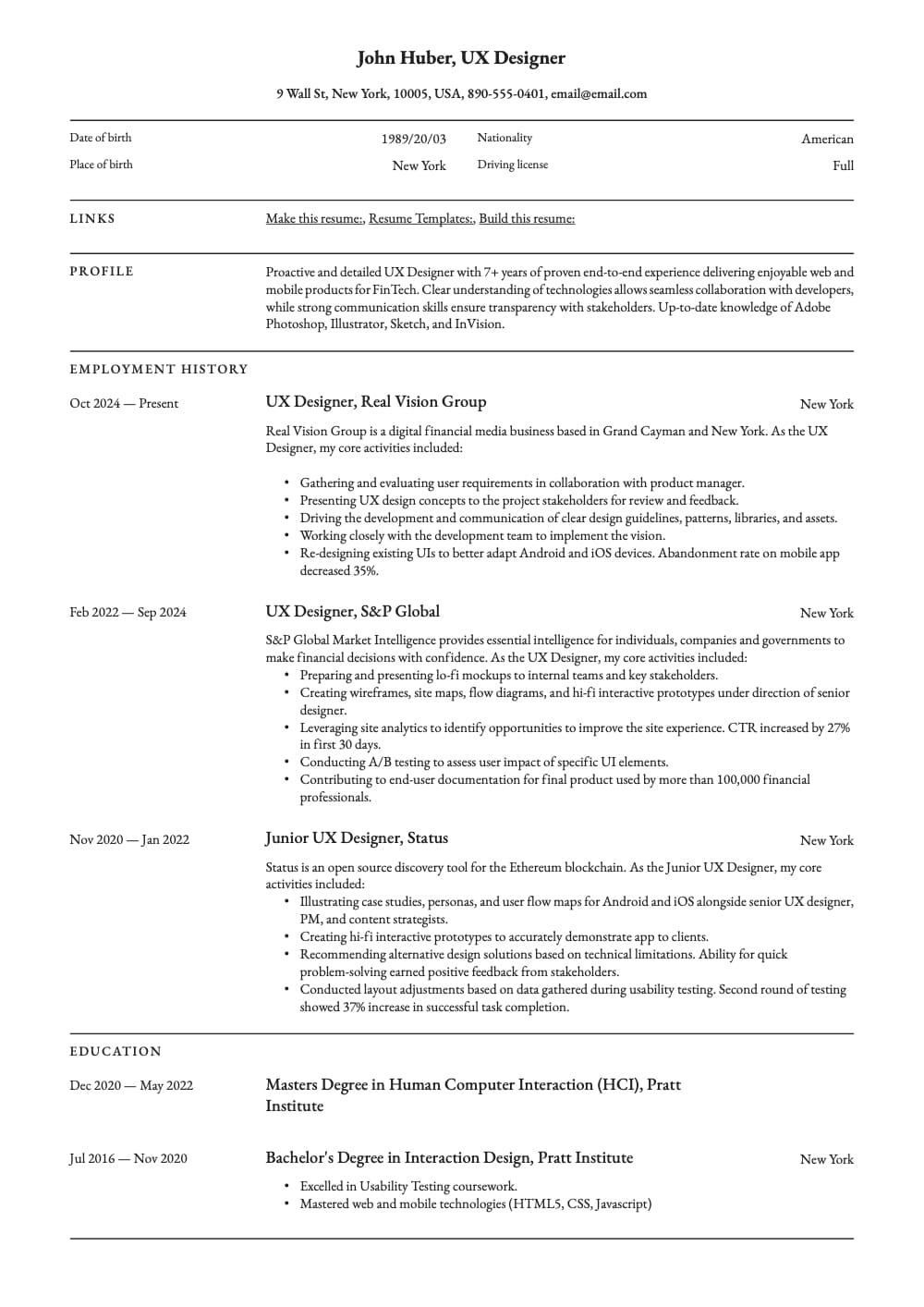
Click a field on the right and we'll highlight where it came from on the left.
Extracted fields
Education
| Major | Degree | School | End date | Start date |
|---|---|---|---|---|
Work experience
| Title | Company | End date | Start date | Description |
|---|---|---|---|---|
Sample data. Real engine output.
Overview
What is resume parsing?
Resume parsing — also called CV parsing or résumé extraction — is the process of turning a free-form resume document (PDF, DOCX, image) into structured candidate data. Every applicant tracking system (ATS) and sourcing platform sits on top of this layer. Done with regex and templates, parsing breaks the moment a candidate uses a non-standard layout; done with a layout-aware engine, the same schema covers thousands of variations without per-template setup.
On the sample resume above, Ztract returns the candidate's full name, email, phone, and location; the headline summary paragraph; the work experience array with each role's title, company, and start/end dates; the education array with school, degree, and major; and the skills array — each skill as its own clickable chip linked back to where it appears on the page. The sample resume is for a UX Designer with three roles and two degrees; the output is ready to ingest into Greenhouse, Lever, or Workday in seconds.
Two design choices matter here. First, skills come back as a typed array of strings — not a comma-separated blob — so downstream skill-matching can compare against a candidate database without further string-splitting. Second, dates are normalized: 'Jun 2023', '06/2023', '2023-06', and 'Present' all land in a sortable format. Multi-column resumes, sidebars, and 'creative' layouts that confuse most parsers are read in the right column order.
Hard parts
Where this gets tricky.
The reasons this doc type is harder than it looks — and how we handle them.
-
100+ layout variations
Chronological, functional, hybrid, two-column, sidebar, 'creative' layouts with icon grids. The engine reads reading-order correctly regardless of how the page is arranged.
-
Dates in five formats
'Jun 2023', '06/2023', '2023-06', 'Summer 2023', 'Present' — all normalized to a single sortable date format so downstream filtering and tenure calculations work cleanly.
-
Skills as paragraphs, bullets, or icon grids
Some resumes list skills as 'Python, SQL, React'. Others use bullet points. Others use proficiency bars or icon grids. All come back as a flat array of skill strings.
-
Summary paragraphs preserved
The candidate-headline summary is free prose, not a labeled field — and it's the single most important sentence for recruiters. The engine extracts it verbatim, not as bullet fragments.
Who uses it
Workflows this lands in.
-
ATS feeders
Push parsed resumes into Greenhouse, Lever, or Workday Recruiting with structured experience and skills already populated.
-
Sourcing teams
Dedupe inbound candidates by email/phone, then search the skills array across thousands of resumes in any layout.
-
HR ops
Standardize the shape of every resume — title, company, dates, skills — for downstream reporting on headcount, DEI, and comp benchmarks.
FAQ
Common questions.
What resume formats does Ztract support?
Does it work for resumes in languages other than English?
How are skills returned?
Will it parse work experience with overlapping or 'Present' dates?
Can I integrate this with my existing ATS?
Related
Also useful for these documents.
-
ID cards, passports, KYC
Names, document numbers, dates, MRZ — with locale-aware field validation.
-
Contracts & NDAs
Parties, effective dates, renewal terms, governing law, signatures — out of dense legalese.
-
Medical records & lab reports
Patient info, test panels, reference ranges, abnormal flags — across hospital systems.
Try it on your own document.
Start free with 30 pages. No credit card, no subscription, no setup.