
Passports and ID documents — read in seconds.
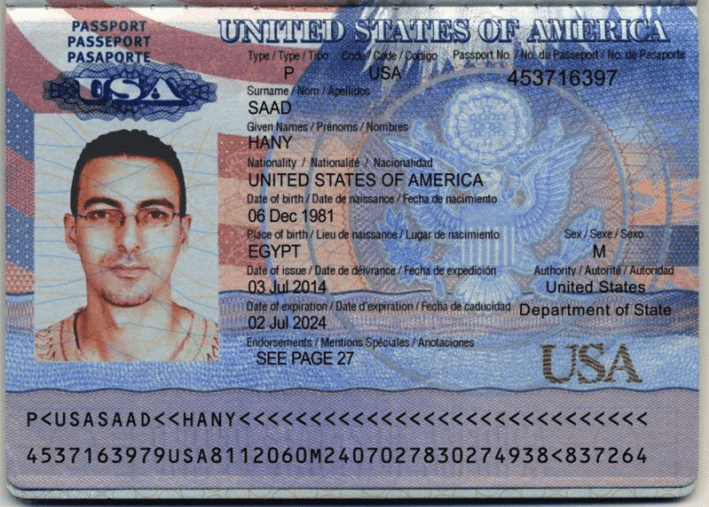
Surname, given names, sex, date of birth, place of birth, nationality, passport number, dates of issue and expiry, plus issuing authority — extracted with every field anchored to the source page.
Live demo
See it on a real document.
Click a field on the right and we'll highlight where it came from on the left.
Extracted fields
Sample data. Real engine output.
Overview
What is passport and ID data extraction?
ID and passport data extraction is the process of turning a photo or scan of a government-issued identity document into structured fields a KYC, onboarding, or background-check workflow can ingest. The work that used to take a verification analyst a minute or two per ID — read each field, type it into the right form, double-check the format — runs in a few hundred milliseconds and never typos a passport number.
On the sample passport above, Ztract returns the holder's surname, given names, and sex; the date of birth, place of birth, and nationality; the passport number with its date of issue and date of expiration; the issuing authority; and any printed endorsements. The sample is a US passport whose holder was born in Egypt — place of birth and nationality are kept as distinct fields rather than collapsed into one.
The schema generalizes across document types. Passports, national identity cards, driver's licenses, and residence permits all map to the same shape — names, dates, document number, issuing authority — and each field comes back in a normalized form (dates as ISO-parseable strings, names preserved in their printed script with Latin transliteration when both appear). Glare, holograms, and security-watermark overlays don't obscure the underlying values.
Hard parts
Where this gets tricky.
The reasons this doc type is harder than it looks — and how we handle them.
-
Glare, holograms, and watermarks
Security features sit on top of the text — laser-engraved holograms, UV-reactive watermarks, glossy laminate that catches phone-camera flash. The engine reads through these overlays rather than around them.
-
Names across scripts
Names in Chinese, Japanese, Korean, Arabic, or Cyrillic come with a Latin transliteration on the next line. Both forms are returned so downstream KYC and sanctions screening can match against either.
-
Dates and document numbers normalized
Date of birth, issue, and expiration come back in a consistent ISO-style format regardless of whether the document prints DD MMM YYYY, MM/DD/YYYY, or YYYY-MM-DD. Document numbers preserve leading zeros and special characters exactly as printed.
-
Per-country field variations
A US passport, an EU national ID card, a Singapore IC, and a UK driver's license each lay fields out differently. One schema, country-specific reading — no per-document-type template setup.
Who uses it
Workflows this lands in.
-
KYC compliance
Onboard customers in fintech, banking, and crypto — ID verification feeds straight into AML and sanctions-list screening with the extracted name and document number.
-
Travel & hospitality
Read passports at hotel check-in or border-side kiosks where every second of delay translates to longer queues.
-
Background checks
Verify candidate or tenant identity across employment and rental screening — extracted fields slot into the existing verification workflow.
FAQ
Common questions.
Which ID document types does Ztract support?
Does Ztract handle names in non-Latin scripts?
Can it read phone photos of IDs, or does it need a scan?
Are dates of birth and expiry returned in a consistent format?
Is ID data extraction GDPR-compliant?
Related
Also useful for these documents.
-
Contracts & NDAs
Parties, effective dates, renewal terms, governing law, signatures — out of dense legalese.
-
Resumes & CVs
Education, experience, skills, languages — normalized into a hiring-ready shape.
-
Medical records & lab reports
Patient info, test panels, reference ranges, abnormal flags — across hospital systems.
Try it on your own document.
Start free with 30 pages. No credit card, no subscription, no setup.