
Lab reports, structured analyte by analyte.
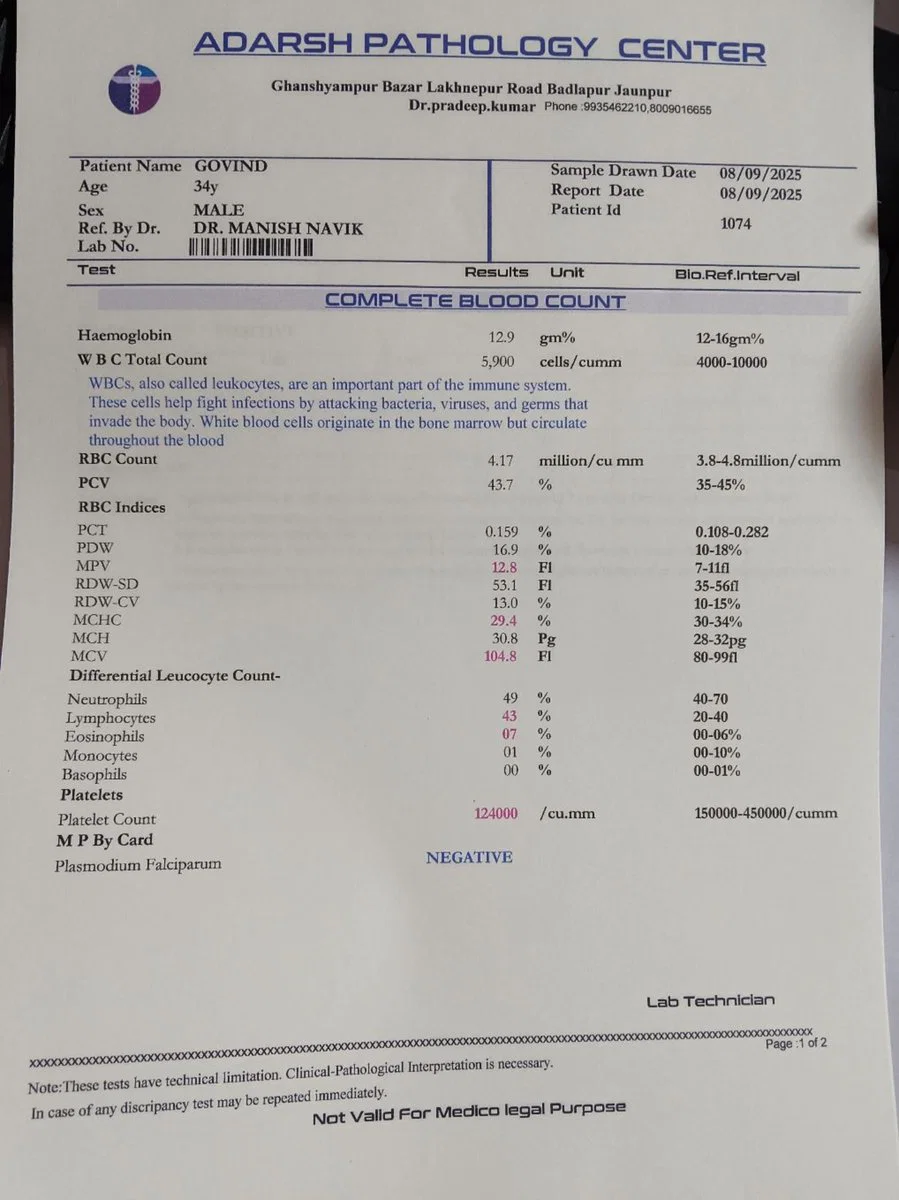
Patient age and sex, report date, plus every analyte from the complete blood count and differential leucocyte count — extracted as structured numeric fields with their units intact.
Live demo
See it on a real document.
Click a field on the right and we'll highlight where it came from on the left.
Extracted fields
Complete blood count
Differential leucocyte count
Sample data. Real engine output.
Overview
What is lab report data extraction?
Lab report data extraction turns blood-test and panel PDFs into structured analyte records that clinical research platforms, EHR migration pipelines, and health-tech apps can ingest. The work that used to require a clinical-data abstractor — read each test name, copy each value, type the reference range into a spreadsheet — runs in seconds with every value anchored to its position on the lab printout for audit defensibility.
On the sample report above, Ztract returns the patient's age and sex, the report date, plus two nested test panels: the complete blood count (CBC) with haemoglobin, RBC count, WBC total count, MCV, MCH, MCHC, RDW, PCV, MPV, PDW, and PCT; and the differential leucocyte count with neutrophils, lymphocytes, monocytes, eosinophils, and basophils. Each analyte comes back as a numeric value — not a string — so downstream stats and reference-range checks work without a parsing step.
Lab reports vary widely across labs and regions. Hgb vs Hb, mmol/L vs mg/dL, two-line panel headers vs single-line, comprehensive metabolic panels that span 4-5 pages — the schema is layout-aware enough to keep one panel together as one logical result even when the printout spans pages. The engine handles printed and scanned reports equally; phone photos with mild skew work too.
Hard parts
Where this gets tricky.
The reasons this doc type is harder than it looks — and how we handle them.
-
Unit and abbreviation variations
UK labs print 'Hb', US labs print 'Hgb'; one uses mmol/L, the other mg/dL. The engine keeps the unit attached to the value rather than discarding it during normalization.
-
Reference ranges in five notations
'3.5-5.0', '<5', '>2.0', '3.5 ± 0.5' — each lab prints its reference range differently. When present, we capture both the value and the bound so downstream abnormal-flag logic works.
-
Multi-page panels stitched together
A CBC followed by a differential and a metabolic panel can run 4-5 pages. Repeated headers are deduplicated; the panels stay structurally distinct in the output.
-
PHI fields surfaced for redaction
Patient name, MRN, and date-of-birth (when present) are surfaced in their own fields so downstream HIPAA / GDPR redaction pipelines have a clear starting point without losing the analyte structure.
Who uses it
Workflows this lands in.
-
Clinical research
Build cohort datasets from lab reports that arrive as PDFs across dozens of hospital and lab systems — same schema, regardless of source.
-
Digital health apps
Let patients upload their own lab reports and surface trended analytes (haemoglobin, WBC, lipid panels) over time.
-
EHR migration
Lift historical lab results from PDF archives into a new EHR with structured analytes instead of imported scanned files.
FAQ
Common questions.
Which kinds of lab reports does Ztract handle today?
Are analyte values returned as numbers or strings?
How does the engine handle reference ranges and abnormal flags?
What about PHI and HIPAA compliance?
Can it read handwritten or photocopied lab reports?
Related
Also useful for these documents.
-
ID cards, passports, KYC
Names, document numbers, dates, MRZ — with locale-aware field validation.
-
Receipts & expense reports
Merchant, items, tax, tip, payment method — even when the paper is wrinkled or faded.
-
Contracts & NDAs
Parties, effective dates, renewal terms, governing law, signatures — out of dense legalese.
Try it on your own document.
Start free with 30 pages. No credit card, no subscription, no setup.